

Inside a cyberattack: What’s Actually Happening
For years, Hollywood has taught us to picture a cyberattack as a dramatic, high-speed explosion: a hooded genius furiously typing away on a glowing screen, alarms blaring, and a digital vault breaching in sixty seconds flat.
For business leaders, board members, and decision-makers, this misconception is dangerous. It frames cybersecurity as an IT panic button rather than a continuous operational reality.
The truth is far quieter, far more patient, and vastly different from the movies. By the time a modern enterprise realizes it has been breached, the adversary has usually been inside the network for weeks or months.
To govern risk effectively, leadership needs to understand the true anatomy of a modern cyberattack. Here is what is actually happening behind the scenes, broken down into five distinct phases. We will describe this based on the model depicted below. It will discribe 5 phases loosely based on the Mitre attack framework, and discuss the 4 attack doors. which are commonly abused by cyberattackers. I will conclude the article with some mitigations and actions you can take right now, to protect yourself against adverseries in every attack phase.
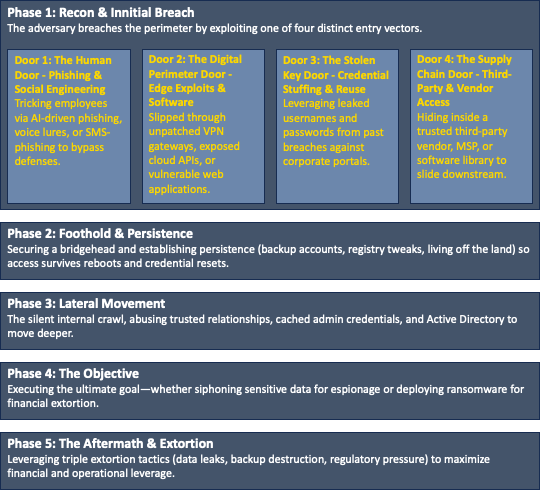
The Attack
Phase 1: Reconnaissance & The Initial Breach (Opening the Door)
A cyberattack never starts with an explosion; it starts with reconnaissance. Attackers don’t hack targets at random—they study them. They map the corporate digital footprint, examine employee LinkedIn profiles, and look for vulnerabilities.
When they are ready to strike, they don’t break down the front wall. Instead, they test the Four Doors of an enterprise to find whichever one was left ajar:
- The Human Door (Phishing): Bypassing technical firewalls entirely by tricking an employee via a targeted phishing email, text, or AI-driven social engineering.
- The Digital Perimeter Door (Edge Exploits): Scanning public-facing web applications, unpatched firewalls, or exposed cloud APIs to slip through a software flaw.
- The Stolen Key Door (Credential Stuffing): Using usernames and passwords leaked from past third-party data breaches, testing them against corporate portals until a valid, unprotected login works.
- The Supply Chain Door (Third Parties): Hiding inside a trusted vendor, software supplier, or managed service provider to slide downstream into the primary target’s network.
Phase 2: Foothold & Persistence (Setting Up Camp)
Once a single door opens, the attacker secures a bridgehead: possibly a low-privilege workstation like a contractor’s laptop or a peripheral server.
Crucially, they don’t grab data yet. Instead, they focus on persistence. They create backup user accounts, alter registry keys, or inject hidden code into startup tasks so that even if the computer restarts or a password is changed, their access survives. To blend in with normal network noise, they “live off the land,” using legitimate administrative utilities already built into the operating system (like PowerShell) rather than loud, signature-heavy malware.
Phase 3: Lateral Movement (The Silent Internal Crawl)
The initial entry point is rarely where the valuable data lives. Now begins the internal journey.
This is where the attacker stops acting like an outsider and starts abusing trusted relationships. Systems in a modern enterprise are designed to trust each other for efficiency. Attackers weaponize that trust by:
- Abusing Administrative Trust: Harvesting cached memory tickets from previous IT administrator logins to masquerade as an admin.
- Exploiting Inter-System Trust: Hopping automatically from a compromised web server straight into an internal database server because backend firewalls assume internal traffic is safe.
- Corrupting Active Directory: Crawling toward the master directory that governs all network permissions, aiming to seize total control of the enterprise identity management system.
Phase 4: The Objective (Extraction or Disruption)
Once the adversary holds the keys to the kingdom, they execute their ultimate goal.
If their motivation is espionage or intellectual property theft, they quietly siphon massive volumes of data, compressing and tunneling it out via encrypted channels to evade Data Loss Prevention (DLP) alarms. If their motivation is financial extortion, they deploy ransomware network-wide, using corporate software distribution tools to lock thousands of endpoints simultaneously at an appointed hour.
Phase 5: The Aftermath & Extortion (The Enterprise Crisis)
Modern attacks don’t end with encryption; they end with leverage. Attackers utilize Triple Extortion: destroying backups, threatening to leak proprietary data to regulators or competitors, and directly harassing clients or investors.
From Policy to Practice: A Security Organizations’ Playbook
Compliance checklists and policy binders don’t stop threat actors: engineering discipline and hard technical controls do.
If we translate our 5 Phases and 4 Doors into a hands-on, practical engineering playbook, we can give organizations concrete technical guardrails to shut those doors and block the internal crawl.
Phase 1 Defense: Slamming the “Four Doors” Shut
To stop attackers at the perimeter before they ever establish a foothold, organizations must deploy targeted technical defenses for each of the four entry vectors:
1. For the Human Door (Phishing)
- Continuous Security Awareness & Human-Layer Simulation Shift away from static annual training videos and generic phishing templates; instead, deploy continuous, contextual security coaching paired with realistic, localized simulations that test resistance to sophisticated AI-driven social engineering and deepfake lures.
- Implement Phishing-Resistant MFA: Ditch standard SMS and mandate mobile or hardware security keys (like YubiKeys, or authenticator) or passkeys for all corporate authentication.
- Email Sandboxing & Link Rewriting: Automatically sandbox incoming email attachments and rewrite URLs so links are evaluated dynamically at the time of click, not just at the time of delivery.
2. For the Digital Perimeter Door (Edge Exploits)
- Automated Vulnerability Management & Attack Surface Monitoring: Run continuous external attack surface discovery tools to find shadow IT, forgotten test servers, and unpatched edge firewalls or VPN gateways. Tie this to strict SLAs: critical public-facing CVEs must be patched within 48 to 72 hours.
- Zero Trust Network Access (ZTNA): Move away from legacy corporate VPNs (which give flat network access once connected) to ZTNA solutions that authenticate and authorize every single user and device session before granting access to specific applications.
- Secure Software Engineering & Shift-Left Architecture: Embed security into the development lifecycle by mandating secure coding standards, automated static and dynamic application security testing (SAST/DAST) in the CI/CD pipeline, and strict input validation to eliminate injection flaws before code ever reaches production.
- Rigorous Infrastructure & Edge Hardening: Lock down all internet-facing assets by disabling default credentials, removing unnecessary services and ports, enforcing strict memory safety protections, and deploying Web Application Firewalls (WAF) coupled with runtime application self-protection (RASP) to neutralize zero-day exploits at the perimeter.
- Network monitoring Monitor (external) network traffic for attack patterns, and launch an investigation upon suspicious activity.
3. For the Stolen Key Door (Credential Stuffing)
- Continuous Dark Web & Leaked Credential Monitoring: Implement automated tools that check corporate email domains against known credential dumps. If an employee’s password appears on a dark web forum, force an immediate password reset and session revocation.
- Conditional Access Policies: Restrict logins based on context (e.g., block sign-ins from impossible travel speeds or unmanaged, non-compliant personal devices).
4. For the Supply Chain Door (Third Parties)
- Strict Vendor Network Segmentation: Treat third-party vendors and contractors as untrusted external entities. Place them in restricted VLANs or isolated network segments with zero direct line-of-sight to core databases.
- Software Bill of Materials (SBOM): Require software vendors to provide an SBOM to track opensource dependencies and quickly identify when a third-party library has a zero-day flaw.
Phase 2 & 3 Defense: Stopping Persistence and Lateral Movement
Once an attacker is inside, perimeter controls are useless. Organizations must implement internal technical friction to stop them from moving:
- Strip Local Admin Rights: Standard employees and contractors should never have local administrator rights on their workstations. This single control stops attackers from installing persistent payloads or running credential-dumping tools like Mimikatz.
- Micro-Segmentation (Zero Trust Internal Architecture): Do not allow workstations to freely talk to other workstations or backend servers. Implement internal firewalls and micro-segmentation so that even if a workstation is compromised, it cannot send Server Message Block (SMB) traffic across the network to probe neighboring machines.
- Harden Active Directory & Credential Guard: Enable Windows Defender Credential Guard to isolate secrets (like Kerberos tickets) in hardware-backed security, preventing attackers from dumping them from system memory.
- Tiered Administration Model: Separate admin accounts completely. A Domain Administrator should never log into a standard workstation or server where their session tokens can be harvested. Use dedicated, hardened jump hosts (Privileged Access Workstations - PAWs) for administrative tasks.
- Network monitoring Monitor (internal) network traffic for attack patterns, and launch an investigation upon suspicious activity.
Summary Engineering Checklist
- Perimeter: Hardware-backed MFA (no SMS), automated edge patching (<72h), and replacing legacy VPNs with ZTNA.
- Identity: Leaked credential monitoring, strict conditional access, and automated session revoking.
- Internal Architecture: Zero local admin rights, strict internal micro-segmentation, and tiered Active Directory administration.
- Detection: Monitor internal- and external networks for suspicious activities which allows you to catch an hacking attack early on or, detect maliscious activity within your network.